One of my main interests outside my field of research is network and system administration. I became particularly interested in this topic after working for over two years in the Técnico Lisboa’s Departments of Electrical and Computer Engineering’s Computer Laboratory and kept this skill alive ever since.
After ceasing my functions as a system administrator, I decided to apply some of the knowledge I gathered to remodel my house’s intra-network and give it the robustness that the out-of-the-box network providers’ solutions lack. Mainly, I wanted to address the following aspects:
- Better IP management and allow to create fixed IP leases;
- Creation of an internal DNS server to facilitate remote access from within the local network;
- Creation of a VPN;
- Allow for Wake-on-Lan on my hardware servers;
- Creation of centralized services of data storage, authentication, media server, and web server.
- Distribute access points throughout the house to guarantee better Wifi coverage.
To support such needs, I implemented the following physical/virtual infrastructure. 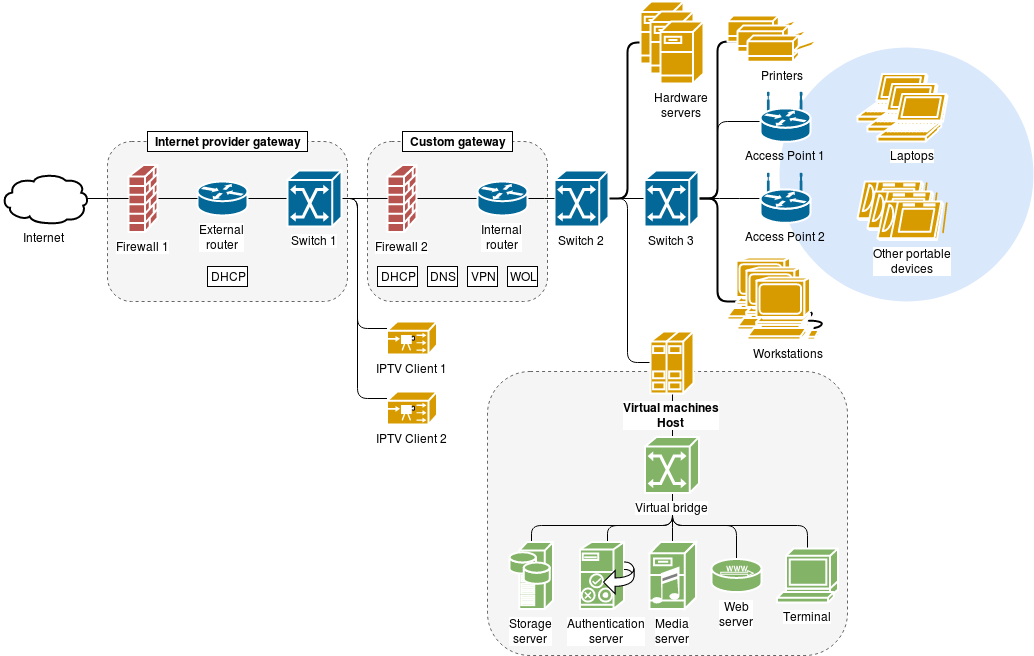
The custom gateway was made of an old computer running the IPFire gateway solution.
The virtual machines host was also built from an old computer and upgraded to support all the required services. A minimalistic version of CentOS 7 was installed, and the machine was configured to be a Virtual Host. To isolate the services I wanted to run, four main VMs were created:
- The storage server runs a minimalistic version of CentOS. It only enables two services: NFS and SAMBA. Both services are protected by the centralized authentication provided by the authentication server. Also, the HDDs used for storage purposes are managed directly by this VM, and the host operating system has no access to them. Additionally, these HDDs are mounted in a RAID 10 scheme to guarantee both redundancy and scalability.
- The authentication server runs a minimalist version of CentOS and enables the FreeIPA identity management system. All the main services use this mechanism to authenticate the users.
- The media server enables the DLNA service that is supported by most Smart TVs. This way, a Smart TV connected to the network can easily reproduce images, music, and videos stored in the data HDDs.
- The web server holds all the services responsible for serving HTTP/HTTPS content and enables the automatic serving of the subdirectory /web in the users’ home folders.
For communicating with the outside world (internet), some ports were forwarded from the internet provider’s gateway to the custom gateway, and a DDNS service was configured in the former to allow easy name resolution. To provide a basic security layer, the infrastructure counts with two firewalls and all hosts enable a third firewall and the Security-Enhanced Linux service. For security reasons, I provide no details on which ports are forwarded and how the firewalls are configured, but if you have some “academic questions” you can always ask me directly. 🙂
While the entire process of configuring this system and putting everything to work gave me quite a headache, some of the most challenging tasks are documented in the following tutorials:
- Configure Apache server to serve subdirectory in the user’s home directory
- Configure DokuWiki to use FreeIPA authentication
- Configure Samba to use FreeIPA authentication
All these tutorials contain information that I could not find anywhere else on the Internet!
This has been by far one of the most gratifying projects I have done so far. If you have some questions regarding details on how to implement something for yourself, do not hesitate to email me. 🙂